 Pixel Composer CN
Pixel Composer 中文汉化包 Pixel Composer Chinese Localization
一键汉化 · 装好即离线可用 —— 随附完整预翻译语言包(含入门指南教程),联网时可一键同步最新汉化,可一键回滚。六个区域可自选,想留英文的地方留着就行。提供 Windows 免安装 EXE 与 Linux 一键脚本。
One-click localization, offline-ready. Ships with a complete pre-translated pack (getting-started tutorials included), one-click online sync, and one-click rollback. Six areas are individually toggleable — keep whatever you like in English. Standalone Windows EXE and a Linux one-click script.
快速开始Quick Start
任选一种方式,完成后重启 Pixel Composer 即可看到中文界面。
Pick either method, then restart Pixel Composer to see the Chinese UI.
下载上方「一键汉化 EXE」(发行版附件 PixelComposer-CN-Patcher.exe),双击打开,点击「① 一键汉化」即可。免安装、无需 Python。
Download the release asset PixelComposer-CN-Patcher.exe above, double-click, then click "① 一键汉化". Portable, no Python required.
解压后 ./install.sh 即可(有 tkinter 开图形界面,没有就自动进命令行,功能一致)。只需要系统自带的 Python 3,不装任何依赖。
Unpack and run ./install.sh — opens the GUI if tkinter is present, otherwise an equivalent CLI. Only needs the system Python 3, no dependencies.
tar -xzf PixelComposer-CN-Linux.tar.gz
cd PixelComposer-CN-Linux
./install.sh                    # 图形界面 / CLI
./install.sh install            # 或直接一键汉化 / or install directly
./install.sh deps               # 看看缺什么 / check dependencies
双击仓库内的 一键汉化.bat 并按提示操作(需 Python 3.7+)。
Double-click 一键汉化.bat (requires Python 3.7+).
python patch_tool.py            # 图形界面 / GUI
python patch_tool.py --install  # 命令行安装 / CLI
截图Screenshots
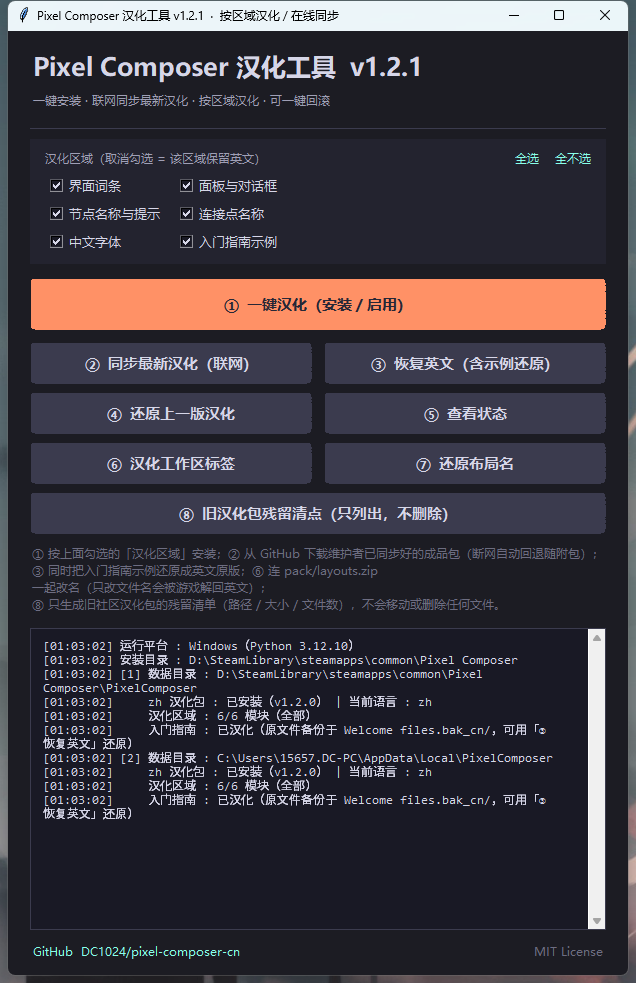
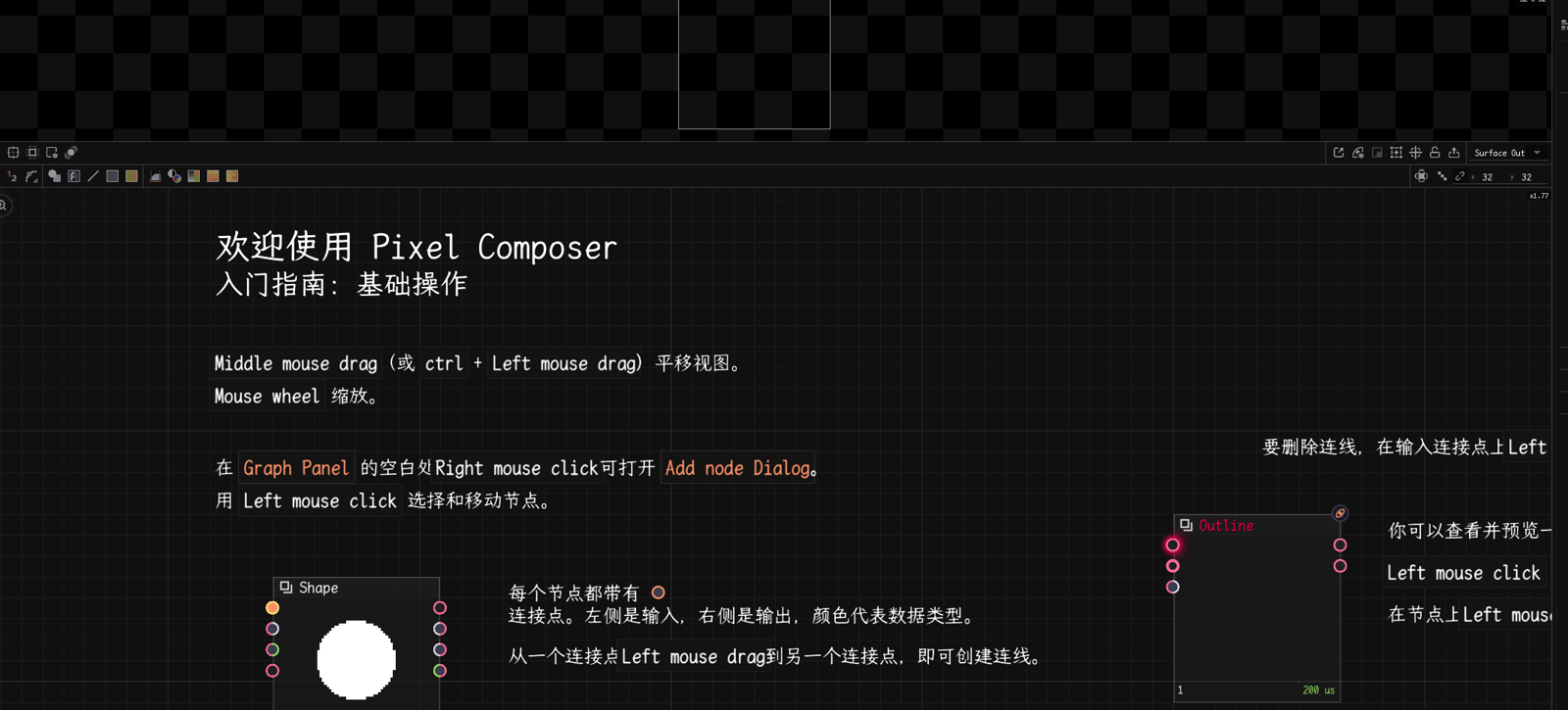
按区域汉化Per-area Localization
界面上有六个复选框,默认全部选中 = 全部汉化。想保留英文习惯(比如已经熟悉的节点名),把对应项取消勾选即可 —— 取消 = 不安装该文件,游戏会回退到内置英文。
Six checkboxes, all ticked by default = full localization. Untick whatever you'd rather keep in English (say, node names you already know) — unticking simply doesn't install those files, so the game falls back to its built-in English.
| 区域 | 覆盖内容 | Area | Covers |
|---|---|---|---|
界面词条 words | 菜单、工具栏、状态栏、设置项 | UI strings words | Menus, toolbars, status bar, settings |
面板与对话框 ui | 各类面板与弹窗正文 | Panels & dialogs ui | Panel and dialog bodies |
节点名称与提示 nodes | 节点名与说明 | Nodes nodes | Node names and tooltips |
连接点名称 junctions | 输入/输出端口名 | Junctions junctions | Input / output port names |
中文字体 fonts | 随包中文字体(不勾可能显示方块) | CJK font fonts | Bundled CJK font (needed to render Chinese) |
入门指南示例 welcome | 教程页与示例工程里的说明文字 | Getting-started examples welcome | Tutorial pages and sample projects |
选择会记录在已安装的 Locale/zh/manifest.json 的 selected 字段里 —— 所以「改了选择」不会被同步逻辑误判成「已是最新」。改完选择请重新点 ① 或 ② 应用。
Your selection is recorded in the installed Locale/zh/manifest.json under selected, so changing it is never mistaken for "already up to date". Re-run ①/② to apply.
图形界面按钮GUI Buttons
| 按钮 | 作用 | Button | Action |
|---|---|---|---|
| 汉化区域(复选框) | 六项可勾选,默认全选;点 ①/② 时应用 | Area checkboxes | Six tickboxes, all on by default; applied on ①/② |
| ① 一键汉化 | 按勾选区域安装并启用中文 | ① Install & enable | Install + enable Chinese for the ticked areas |
| ② 同步最新汉化 | 联网从 GitHub 拉取最新成品包(断网回退随附包) | ② Sync latest | Download latest pack from GitHub (falls back offline) |
| ③ 恢复英文 | 切回英文,并还原入门指南示例 | ③ Restore EN | Back to English, restores tutorial examples too |
| ④ 还原上一版 | 回滚到上次汉化 | ④ Rollback | Roll back to previous pack |
| ⑤ 查看状态 | 显示目录、包版本、语言与已选区域 | ⑤ Status | Paths, pack version, language, selected areas |
| ⑥ 汉化工作区标签 | 改名 + 改写 pack/layouts.zip 条目名 | ⑥ Localize layout tabs | Rename files + patch layouts.zip |
| ⑦ 还原布局名 | 把布局文件名还原成英文 | ⑦ Restore layout names | Restore original layout file names |
| ⑧ 旧汉化包残留清点 | 只列出旧社区汉化包留下的文件(路径/大小/文件数),不删不移 | ⑧ Leftover scan | Lists only what the old community pack left behind (paths / sizes / counts) — nothing is deleted or moved |
②「同步最新汉化」不在本地做翻译,而是从 GitHub 下载一份已经翻好的成品包:先拉清单 zh/manifest.json(依次尝试 GitHub Pages → jsDelivr CDN → GitHub Raw 三个源),再用 sha256 比对本地,只下载有变化的文件(11 MB 中文字体通常只在首次下载,之后每次一般只有几十 KB 的 json),备份现有 zh 后整包写入两个数据目录。断网或源都不可达时自动回退随附汉化包;已是最新则直接提示「无需更新」。
两个首次同步会体会到的细节:路径统一做百分号编码(welcome/** 的路径带空格,不编码三个源都取不到);大文件(>2 MB,也就是那 11 MB 字体)优先走 CDN —— 实测 Pages 对静态大文件限速明显(同一机器 25 KB/s,jsDelivr 71 KB/s),且某个源失败时单个文件会自动换下一个源。整包 41 个文件首次实测约 5 分钟(11 MB 字体占大头)。另外还会拒收版本低于本地已装的清单(jsDelivr 对 @main 有较长缓存,防止 Pages 临时不可达时把装好的包降级)。
② "Sync latest" does not translate anything locally. It downloads an already-translated pack from GitHub: it fetches zh/manifest.json (trying GitHub Pages → jsDelivr CDN → GitHub Raw in order), compares sha256 against your install, and downloads only changed files (the 11 MB CJK font is normally a one-time download; later syncs are usually a few dozen KB of JSON). The current zh is backed up, then the whole pack is written to both data roots. If offline, it falls back to the bundled pack; if already current, it says so.
Two things you'll notice on the first sync: paths are percent-encoded (the welcome/** paths contain spaces, which no source serves unencoded), and files over 2 MB — the 11 MB font — prefer the CDN over Pages (25 KB/s vs 71 KB/s measured). Individual files also fail over to the next source automatically; a full first sync measured about 5 minutes. Manifests older than your installed version are refused (jsDelivr caches @main for a long time, so this prevents a downgrade if Pages is unreachable).
命令行参数CLI Flags
--install           安装并启用中文
--update / --sync   从 GitHub 同步最新汉化包
--restore           恢复英文(含示例还原)
--rollback          还原上一版汉化
--status            查看状态(平台/目录/包版本/区域)
--leftovers         旧汉化包残留清点(只列出)
--layouts           汉化工作区标签
--layouts-restore   还原布局文件名
--modules <列表>    只汉化指定区域,逗号分隔
--install-dir <路径> 手动指定游戏目录
--list-modules      列出可选汉化区域
--no-gui            无界面直接安装
--cli               交互式命令行
环境变量:PIXELCOMPOSER_DIR 指定游戏目录、STEAM_ROOT 指定 Steam 根目录、PCCN_SOURCE 指定镜像源。
Env vars: PIXELCOMPOSER_DIR (game dir), STEAM_ROOT (Steam root), PCCN_SOURCE (mirror).
python patch_tool.py --install --modules words,nodes   # 只汉化界面词条 + 节点
python patch_tool.py --leftovers                       # 旧包残留清单(只读)
更新机制How Updates Work
翻译只在维护者侧做一次,客户端只下载成品包 —— 结果统一、质量可控,也不必在每台机器上各跑一遍翻译引擎。
Translation happens once on the maintainer side; clients only download the finished pack — consistent results, controllable quality, and no engine running on every machine.
运行 python build/sync_upstream.py:抽取游戏自带官方 en 基准 → 补翻新增/残留词条 → 写 zh/ 与 zh/manifest.json。加 --push 可直接提交推送。
Runs python build/sync_upstream.py: extracts the official en baseline, retranslates new/leftover entries, writes zh/ + zh/manifest.json. Add --push to commit and push.
推送后 zh/ 可从 GitHub Raw、GitHub Pages、jsDelivr CDN 三处下载,任一可用即可。
After pushing, zh/ is reachable via GitHub Raw, GitHub Pages and jsDelivr CDN — any one is enough.
点「② 同步最新汉化」(或 --sync):拉清单 → 比对哈希 → 只下载变化的文件 → 备份后安装。本地不跑翻译引擎。
Clicks "② Sync latest" (or --sync): fetch manifest → compare hashes → download only changed files → back up and install. No engine runs locally.
汉化包版本记录在 zh/manifest.json 的 version 字段,随包一起下发;「⑤ 查看状态」会显示当前安装的包版本。某个源不可用时会自动换下一个源;也可用环境变量 PCCN_SOURCE 指定镜像。
The pack version lives in zh/manifest.json and travels with the pack; "⑤ Status" shows the installed version. If a source fails, the next one is tried automatically; set PCCN_SOURCE to use a mirror.
工作原理How It Works
Pixel Composer 使用 Locale 覆盖机制(而非修改二进制):从 Locale/{语言}/ 读取各类 json,en 作为兜底最先加载。本工具把预翻好的 zh 包写入该目录,并把语言开关 preferences/1171/keys.json 的 local 改为 "zh"。由于游戏的 persistPreference.json 在两处数据目录间互相指向,工具会同时写入两个目录并确保两处语言都设为 zh,汉化才能稳定生效。
Pixel Composer uses a Locale overlay (not binary patching): it reads json files from Locale/{lang}/, with en as the first fallback. This tool drops the pre-translated zh pack there and sets local to "zh" in preferences/1171/keys.json. Because the game's persistPreference.json points circularly between two data dirs, the tool writes to both roots and sets zh in each, so the localization reliably applies.
LocalAppData/PixelComposer/Locale/zh/...   ← 写入点 1
游戏目录/PixelComposer/Locale/zh/...        ← 写入点 2
两处 keys.json 均设 local="zh"
已知限制Known Limitations
| 位置 | 情况与处理 | Where | Status & workaround |
|---|---|---|---|
浮动面板标题Toolbar · Collections |
由主程序内部的面板注册表直接绘制,不走语言包;已实测 20 余种候选键名全部无效。无需处理:打开面板的入口「面板菜单」条目已全部汉化。 | Floating panel titles | Drawn by the executable's internal registry, never through locale tables (20+ candidate keys tested). Cosmetic only — the panel menu entries are fully translated. |
工作区布局标签Horizontal · Vertical … |
标签显示 layouts/*.json 的文件名,不查语言表;只改文件名会被游戏从 pack/layouts.zip 重新解出英文名还原(实测会变成中英两套标签)。⑥ 会一并改写 zip 条目名,改完实测只剩中文名;⑦ 一键还原。 |
Workspace layout tabs | Tabs show layouts/*.json file names. Renaming files alone gets reverted from pack/layouts.zip (duplicate tabs observed). ⑥ also patches the zip entries; ⑦ reverts. |
notes/ 内置参考文档(混合模式 / L 系统 / MK 面板) |
带专用排版标记({g}、<x20> 等)的 Markdown 文档,官方语言包只有英文版,当前未翻译,游戏会回退显示英文原文。 |
Built-in notes/ reference docs |
Markdown docs using a custom layout markup; English-only upstream and not translated yet — the game falls back to English. |
入门指南卡片标题Introduction · Node Shortcuts |
卡片标题取的是 .pxc 的文件名(去掉数字前缀),程序不查语言表 —— 所以标题保持英文,但点进去以后页面里的说明文字是中文(已实机验证)。本方案按同名覆盖(文件名保持英文),不会出现中英两套重复卡片,也不破坏 Steam 自动更新;想要中文文件名可提 Issue。 |
Getting-started card titles | Titles come from the .pxc file names (numeric prefix stripped) and never pass through a locale table — so titles stay English while the page you open is fully Chinese (verified in-game). Same-name overwrite keeps Steam updates intact and avoids duplicated card sets. |
2d · 3d · CMYK · OKLAB · PXC |
品牌名 / 格式名 / 专有名词,按约定保留英文以免歧义。 | Brands / formats / proper nouns | Kept in English on purpose to avoid ambiguity. |
Linux 图形界面tkinter 缺失 |
Debian/Ubuntu 要装 python3-tk、Arch 要 tk;SteamOS / Steam Deck 根分区只读装不上。不用管:install.sh 会自动切到命令行界面,功能完全一致;./install.sh deps 可查缺什么。 |
Linux GUI without tkinter |
Needs python3-tk on Debian/Ubuntu or tk on Arch; SteamOS has a read-only root. Optional — install.sh falls back to an identical CLI. Run ./install.sh deps to check. |
相比旧社区汉化包vs. Old Community Pack
| 对比项 | 旧社区包 | 本方案 | Aspect | Old pack | This project |
|---|---|---|---|---|---|
| 安装方式 | 手动往游戏根目录丢 zh/ 和 Welcome files/ | 一键装到正确的数据目录(自动双写),教程按同名覆盖 | Install | Manually drop folders into the install root | One click into the right data roots (auto dual-write); tutorials overwritten in place |
| 更新速度 | 慢,手动发布 | 维护者定期同步上游,客户端一键取最新 | Updates | Slow, manual | Maintainer syncs upstream; clients pull in one click |
| 覆盖率 | 较低 | 词条 98.5%(1888/1916)· 节点 ~93% · 教程页 33/33 | Coverage | Lower | words 98.5% (1888/1916) · nodes ~93% · tutorials 33/33 |
| 联网需求 | 常需联网 | 装好后离线可用;② 联网只取更新 | Network | Often online | Offline-ready; ② only fetches updates |
| 可回滚 | 通常不支持 | 备份 + 一键回滚 | Rollback | Usually no | Backup + one-click rollback |
| 按区域汉化 | 不支持 | 六个区域可勾选,默认全选 | Per-area | No | Six tickboxes, all on by default |
| 跨平台 | 只有 Windows | Windows + Linux(原生/SteamOS/Proton),macOS 路径已适配 | Platforms | Windows only | Windows + Linux (native, SteamOS, Proton); macOS paths handled |
| 残留处理 | — | 内置只读清单(⑧),只列不删 | Leftovers | — | Built-in read-only inventory (⑧), never deletes |
装过旧包?旧包会把 zh/ 和 Welcome files/ 永久留在游戏根目录(实测一台机器上是 10 项 / 约 32.7 MB,含 13.6 MB 的汉化 EXE 与中文名教程文件夹)。点 ⑧ 或跑 --leftovers 可以得到完整清单 —— 本工具不会替你删,确认不需要请自行手动处理。
Used the old pack before? It leaves zh/ and Welcome files/ in the install root forever (10 items / ~32.7 MB on one machine tested, including a 13.6 MB EXE and Chinese-named tutorial folders). Use ⑧ or --leftovers for a full inventory — this tool never deletes them for you.